Most projects have their own coding standards which define naming conventions, restrict language usage and define rules and recommendations for the use of the language. These rules have to be checked during the review and to make life easier QuickRev supports the direct usage of checklists.
Usage Of Checklists
checklist_example.xml file.After loading the checklist like described above it will be listed in the → menu and can be opened there.
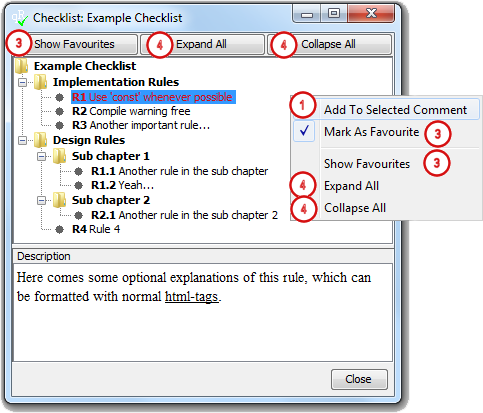
The opened checklist dialog allows the selection of the rules. If an optional description is given for a rule this will be shown in the text field at the bottom of the dialog. (The description will not be saved in the project file.)
|
|
|
-
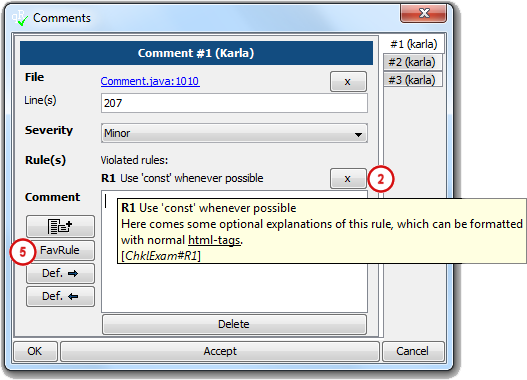
To assign a rule to a comment, a comment has to be selected in the comment dialog. The assignment can be done via the context menu item Add To Selected Comment, via double click at the rule to be assigned or via the enter-key. If a rule is assigned to a comment the comment field is not mandatory anymore, so no additional description has to be made.
-
To remove a rule from a comment use the x button behind the rule in the comment dialog.
-
To find rules faster they can be marked as favourites. Afterwards Show Favourites hides all rules not marked as favourites, another click on the button respectively menu item shows all rules again. The favourite rules will be saved in the users
.quickRev/config/mainfile, so after a restart of QuickRev they are available again. -
Use Expand All or Collapse All to expand respectively collapse all rules.
-
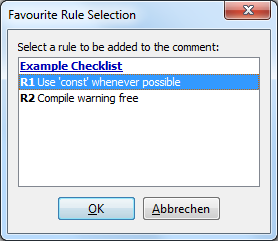
If you have selected some favourite rules already, you can selected these rules easily via the FavRule button in the comment dialog, which brings up the following dialog where the rule can be selected easily.